GDL Development Environment
Contemporary GDL programming with Cursor, Graphisoft Extensions, and b-prisma Tools
Contemporary GDL programming with Cursor, Graphisoft Extensions, and b-prisma Tools
Developing GDL objects for Archicad can be complex and time-consuming. However, combining state-of-the-art tools and artificial intelligence creates a development environment that takes productivity, code quality, and developer experience to a new level. In this article, I will show you how you can build a perfectly coordinated toolchain for professional GDL development with Cursor, Graphisoft's GDL Development Environment, GDLnucleus, and the GDL Task Runner from b-prisma.
Cursor as an intelligent development assistant
A central component of this workflow is Cursor. Cursor is based on Visual Studio Code and extends it with an AI-supported development assistant. Unlike classic editors, Cursor works not only line by line, but also on a project-specific basis. The AI can recognize relationships, analyze existing GDL structures, and make targeted suggestions that go beyond simple autocomplete. This is a real advantage, especially for larger or historically grown GDL objects. Functions can be explained, loops optimized, or older syntax gradually modernized. Change requests can be formulated in normal language without losing track of the code. Cursor remains a tool, not an automaton—the developer retains control.
Features
-
AI pair programming: Work with an AI assistant that understands, analyzes, and generates GDL code
-
Context awareness: The AI knows your entire code base and can make cross-project changes
-
Intelligent code completion: Not just simple autocomplete, but context-based suggestions for entire functions
-
Natural language: Describe what you want in normal English—the AI will implement it
-
Refactoring and debugging: The AI helps optimize and debug existing code
-
VS Code compatibility: All VS Code extensions also work in Cursor
The GDL Development Environment from Graphisoft as a foundation
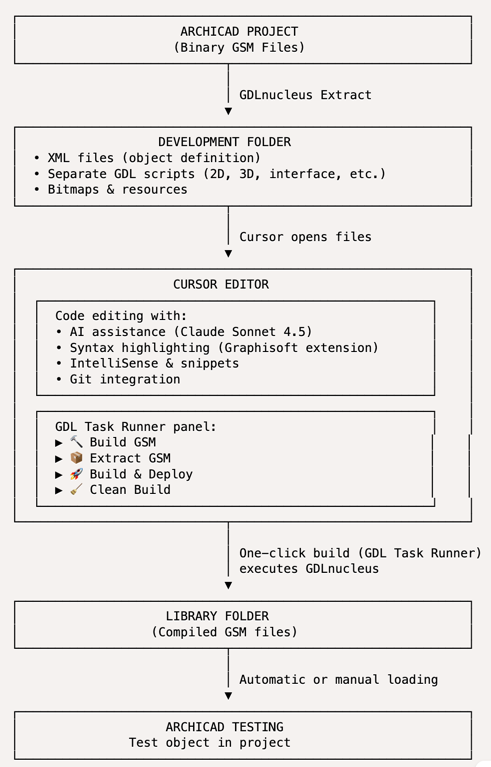
The official GDL Development Environment from Graphisoft is essential for Cursor and similar editors to reach their full potential. It forms the technical foundation for professional GDL coding. Syntax highlighting and code snippets not only make GDL more readable for humans, but also clearly interpretable for AI-supported tools. Clearly structured, correctly highlighted code reduces misunderstandings and noticeably improves the quality of suggestions.
Features:
-
Syntax highlighting: Color highlighting of all GDL commands, variables, and functions
-
Code snippets: Pre-built templates for frequently used GDL constructs
-
IntelliSense: Auto-completion for GDL commands with parameter descriptions
-
Code outlining: Structured overview of your script with jump marks
-
Quick reference: Integrated reference work for GDL commands
GDLnucleus from b-prisma as a bridge between text and GSM
GDLnucleus from b-prisma takes this a step further. While Archicad works internally with binary GSM files, GDLnucleus consistently relies on text-based development. GSM objects are broken down into XML and GDL files, processed in a structured manner, and then reliably reassembled. This opens up several advantages at once: individual scripts can be maintained separately, version control with Git becomes practical, and changes remain traceable. Above all, however, modern editors and AI systems can be used effectively because they work with real text files. GDLnucleus thus acts as a link between Archicad and contemporary development processes.
Conversion routines:
-
GSM 2 XML
-
GSM 2 HSF
-
XML 2 GSM
-
HSF 2 GSM
-
Include Pictures
-
SVG 2 TIFF
-
Parameters: CSV Export + CSV Export for Rukovoditel
-
Create LCF File
The GDL Task Runner for reproducible workflows
The workflow is rounded off by the GDL Task Runner from b-prisma. It makes recurring tasks visible and easy to execute. Instead of manually operating complex command lines or configuration files, clearly structured one-click actions are available. Typical processes such as extracting or compiling objects can be executed in a reproducible manner. This saves time and reduces sources of error, especially with larger libraries or frequent object maintenance. Fewer detours, more focus on the actual code.
Features
-
Tree view integration: All tasks clearly displayed in the Explorer panel
-
One-click execution: Start tasks with a single click
-
Visual feedback: Status display and error reporting
-
Categorization: Grouping of tasks
-
Refresh function: Automatic update when changes are made
A modern GDL workflow
The interaction creates a development environment that does not replace classic GDL programming, but rather complements it in a meaningful way. Archicad remains the target system, GDL the language. What is new is the quality of the tools in between. Anyone who wants to develop GDL on a long-term, maintainable, and professional level will find a workflow here that is viable for both individual developers and teams. It's not a revolution, but a clean further development—and that's exactly what counts in everyday life. And AI is used as a tool, not as a decision-maker
Workflow diagram
Costs
-
Cursor offers a free version with generous weekly rate limits and offers different subscription models, starting at $20/month: https://cursor.com/
-
An alternative is Google Antigravity. There is a free version with generous weekly rate limits: https://antigravity.google/
-
Another great AI-Model is Claude Code for VS Code. It works like the other ones, but you must have a subscription for Claude.
-
Graphisoft's GDL Development is free: VSC Marketplace (A .vsix file is required for installation in Cursor)
-
GDLnucleus for VSC on MAC OS: €25 in the GDL Object Shop
-
GDLnucleus-light for MAC OS and Windows: free on the Downloads tab
-
gdl-task-runner-1.0.0.vsix: free on the Downloads tab
- readme file for gdl-nucleus-light
- readme file for gdl-task-runner